


I wrote this six years ago and never hit publish.
In June 2020, the world was locked down. Offices closed. Gyms closed. Friends turned into faces on a screen. It looked to me like everyone was picking up their phone more than ever.
So I wrote this guide. The plan was to build a website around it and help people take their attention back. The website got complicated, so I shelved it. The guide sat in a folder for six years.
The rules didn’t sit. They still run my phone today.
This month, I pulled the guide out and looked up the numbers. The lockdowns ended. The habit didn’t. In 2015, 21% of U.S. adults told Pew Research they were online “almost constantly.” In early 2021, during the pandemic, it was 31%. By 2025, it hit 41%.
I see it in my own life. People I rarely saw on their phones are on them all the time now. People give up things they used to do so they can spend more time scrolling. The apps got better at holding us. Short video feeds never end. AI assistants, smartwatches, and earbuds now add their own pings.
Then I heard an idea that stuck with me. People scroll because they don’t know what to do with their lives. I believe it. A 2023 review of 59 studies found a clear link between boredom and problematic digital media use. The research can’t yet prove which causes which.
My bet is the scroll fills the space where purpose should be.
This guide matters as much now as it did in 2020. So I updated it for today’s phones, and I’m finally publishing it.
Your phone is a tool. A powerful one. Set it up to serve you, or it will train you to serve it. Every app on it has a team of very smart people paid to capture your attention. You need your own system.
This goes for your wearables too. Watches, rings, fitness bands, AI pins, and earbuds all buzz. Apply the same rules to each one.
One more thing before we start. Your life, job, and responsibilities are different from mine. Some of these settings won’t fit. Challenge that first, though. Most “must-have” alerts are habits wearing a disguise. Pick at least two or three of these and run them for a week. You’ll feel the difference.

Table of Contents
Bedtime | Wake up | Notifications | Focus modes | Time limits | Home screen reset | Grayscale | Before bed | Phone-free zones | Driving | The one-week delete challenge | Media fast | The Sunday review | When you need a harder wall | End of the day | Help for your device
Key Takeaways
Phone use didn’t drop after lockdown. Americans online “almost constantly” rose from 31% in 2021 to 41% in 2025.
Turn off every notification that doesn’t come from a person who needs you. Let only your closest people break through.
Make your phone boring. Grayscale cut phone use by 39 minutes a day in one study.
Night Shift and dark mode won’t fix your sleep. Putting the phone down will.
Keep your phone off the table at meals. It tells the people with you what matters more.
Delete your most addictive apps for one week. Bring back only the ones that earn it.
Review your screen time every Sunday and make one change for the week ahead.
The scroll fills empty space. Fill that space with purpose first.
Bedtime
Put your phone on Do Not Disturb or airplane mode. Charge it outside your bedroom, or at least across the room.
Buy an alarm clock. A basic one costs about $10 to $15.
Don’t let someone else's emergency be the first voice of your day. The inbox can wait. The group chat can wait. You get the first hour.
Wake Up
Go 30 minutes after waking before you pick up your phone. Then stretch it. 45 minutes. An hour. See how long you can go.
Use that time for something that makes you better. Read, move, think, write, or sit with your coffee. Marcus Aurelius ran an empire and still wrote Meditations for an audience of one. Start your day with your own thoughts before you take in anyone else’s.
Notifications
Turn off every notification that doesn’t come from a human who needs you.
You don’t need a ping every time someone likes your post on Instagram, Facebook, X, TikTok, LinkedIn, or Threads. You don’t need a banner for every email.
Your other devices count too. Smartwatches, rings, earbuds, and AI assistants each found a new way to tap you on the shoulder. Many watches mirror every phone alert to your wrist unless you change it. Open your watch’s companion app and choose which alerts you want to receive there. Do the same for any AI assistant that sends you suggestions, reminders, or summaries you never asked for.
Both major phones now help with this.
iPhone. Use Scheduled Summary (Settings > Notifications > Scheduled Summary). It bundles non-urgent alerts and delivers them at times you choose.
Android. Turn off notifications app by app (Settings > Notifications > App notifications). Many Android phones also offer notification summaries or snoozing.
Then put “check messages” on your calendar. Do the same for social media, if you enjoy it. Scheduled scrolling is a choice. Random scrolling is a reflex.
Here’s my setup. My phone stays on silent, with vibration off. The only people who can break through are my starred contacts, my immediate family. Everyone else waits until I check.
iPhone. Settings > Focus > Do Not Disturb > People. Allow calls and notifications from Favorites only. Turn off vibration for silent mode in Settings > Sounds & Haptics.
Android. Settings > Sound > Do Not Disturb > People. Allow starred contacts only. Turn off vibration in your sound settings.
Focus Modes
Use Focus modes for deep work, deadlines, family dinner, or anything that deserves your full attention. They block chosen apps and silence chosen people.
iPhone. Settings > Focus. Build one for Work, one for Sleep, and one for Personal time. Each can hide apps and filter notifications.
Android. Settings > Digital Wellbeing > Focus mode. Pick the apps to pause and set a schedule.
Time Limits
Open your screen time report. Look at the top three apps and the daily totals. Most people get a jolt here.
Then set limits.
iPhone. Settings > Screen Time > App Limits.
Android. Settings > Digital Wellbeing > App timers.
I cap Instagram at 1 hour a day. Pick a number that makes you slightly uncomfortable. That’s usually the right one.
Home Screen Reset
Your home screen is prime real estate. Whatever lives there gets opened on reflex.
Here’s my whole home screen. A calendar widget, a notes widget, my podcast app, and my book app. That’s it.
Build yours the same way. Keep the few tools that move your day forward on page one. Move everything else off it. When you have to search for an app by name, you get a beat to decide whether you want it.
iPhone. Long-press an app > Remove App > Remove from Home Screen. It stays in your App Library. To hide a whole page, long-press the screen, tap the page dots, and uncheck the page.
Android. Long-press an app and remove it from the home screen. It stays in your app drawer.
Grayscale
Turn your screen gray. The research backs this one up.
A University of Cincinnati study led by Alex Holte had about 220 students switch to grayscale. Their phone use dropped by an average of 39 minutes a day. Color is the candy. Remove it, and the apps get boring fast.
I run mine on a schedule. At 9 PM, my phone goes gray. At 6 AM, the color comes back on its own. I never have to think about it.
To schedule it on iPhone, open the Shortcuts app, create a Time of Day automation, and add the Set Color Filters action. On Android, schedule Bedtime mode with Grayscale turned on.
iPhone. Settings > Accessibility > Display & Text Size > Color Filters > Grayscale. Set it to your Accessibility Shortcut (triple-click the side button) so you can flip it on and off.
Android. Settings > Digital Wellbeing > Bedtime mode. Turn on Grayscale in the screen options. Some phones also offer it as a separate setting.
Before Bed
Wind down your phone at least an hour before sleep. Silence the leftovers and go gray.
For years, I believed Night Shift, Night Light, and dark mode would help my body produce melatonin and sleep better. My original draft of this guide said so. A 2021 BYU study tested that. It tracked 167 young adults and found Night Shift users slept no better than people who used their phones without it. People who put their phones away before bed slept best.
The lead researcher, Chad Jensen, pointed at engagement. The texting, scrolling, and thinking keep your brain wired. Screen color matters less.
So the fix isn’t a warmer screen. The fix is putting the phone down.
iPhone. Settings > Screen Time > Downtime. Schedule it to start an hour before bed.
Android. Settings > Digital Wellbeing > Bedtime mode. Schedule it, and turn on Do Not Disturb at the same time.
Phone-Free Zones
Pick places and times where your phone doesn’t exist. Meals. Conversations. Workouts. Your bedroom.
I don’t eat with my phone. When I’m out to lunch or dinner with my wife, my kids, or friends, it stays in my pocket or in another room. I leave my phone places all the time, and I’m fine with that.
Simon Sinek made this point in his talk “The Millennial Question.” Put your phone on the table, “face up or face down, I don’t care,” and you send a quiet message to the people with you. Something on that phone might matter more than them. That stuck with me. I keep my phone in my pocket because our conversation and time together matter more than any notification that might come in.
The research points the same way. In a University of British Columbia study, more than 300 people went out to eat with friends or family. Those told to keep their phones on the table felt more distracted and enjoyed the meal less than those who put them away.
One honest caveat. An older study claimed that a phone’s mere presence hurts a conversation. A 2021 team tried to repeat it and couldn’t. The cost shows up when you use the phone. So put it away. You lose nothing by doing it.
Driving
Set your phone to silence itself while you drive.
iPhone. Settings > Focus > Driving. Set it to turn on automatically when you connect to CarPlay or your car’s Bluetooth.
Android. Use your phone’s driving mode or Android Auto. Options vary by phone.
Nothing on that screen matters more than the road. According to NHTSA, 3,208 people died in crashes involving distracted drivers in 2024. That’s 3,208 people who didn’t come home. Don’t become one of them. Don’t take someone else’s family with you.
The 1 Week Delete It Challenge
Delete your social media apps, your email app, and any other app that pulls you in without giving you anything in return. Do it for one week.
At the end of the week, decide which ones earn a spot back on your phone.
Most of these services run in a web browser. The browser version is clunkier and less addictive. That friction is the point. You can still run your business and check in on a schedule.
This one move broke my habit of mindlessly checking Twitter and LinkedIn. Six years later, I haven't gone back to almost any of those apps. Instagram is the exception because posting from a phone browser is a pain. I check everything else on my computer, and I schedule my posts ahead of time. My phone stopped being the place where I do social media.
This might be the single best thing on this list.
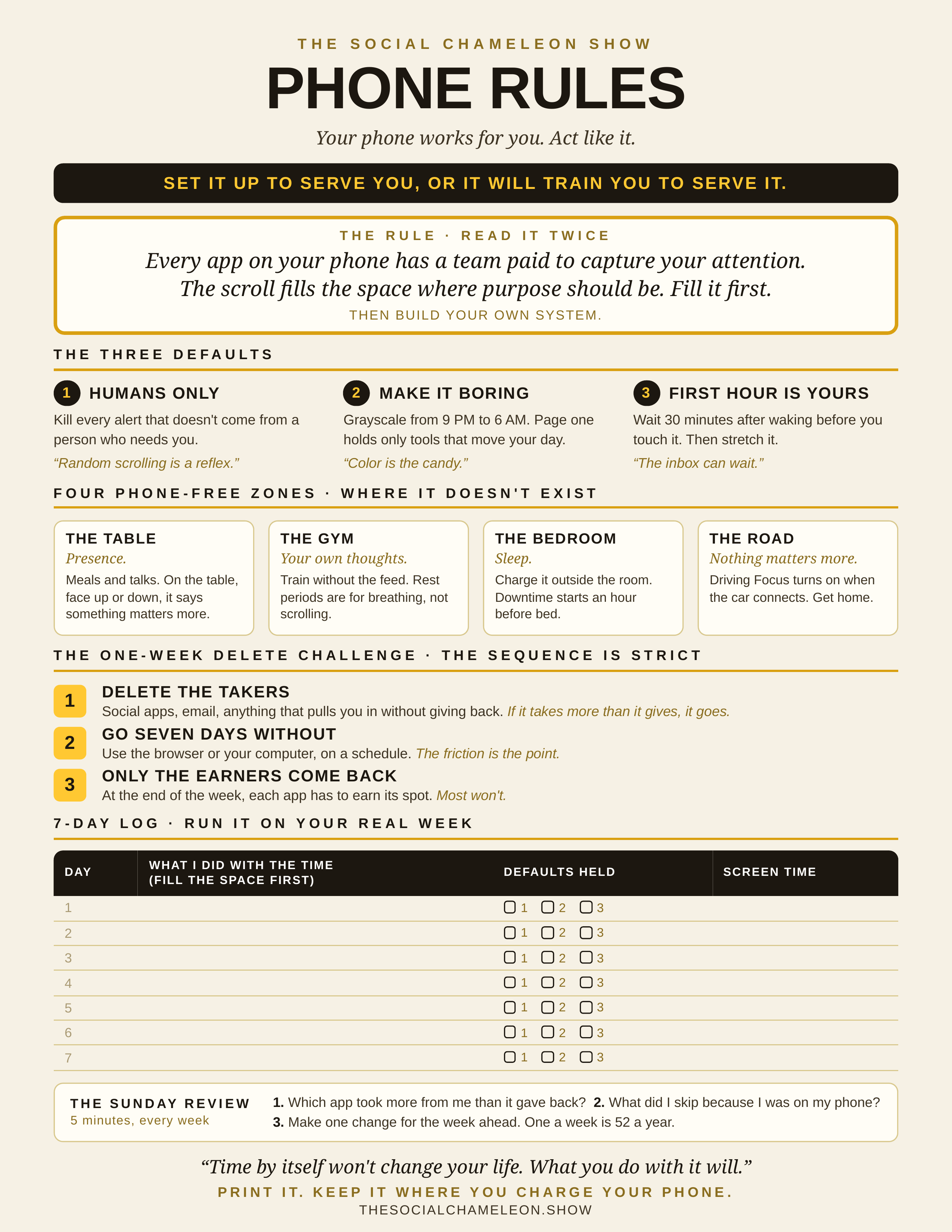
Phone Rules Field Card: Print Edition or Fillable PDF
Media Fast
While you’re deleting apps, cut the noise too. Take a break from cable news, market tickers, political commentary, and any program that runs on fear, outrage, or division.
The Stoics drew a hard line between what you control and what you don’t. Most headlines fall on the second side. Read a weekly summary if you need to stay informed. You’ll miss very little.
Here’s the catch. Cutting the noise leaves an empty space. If you don’t fill it on purpose, the scroll will fill it for you. Decide ahead of time what goes there. A book, a walk, a workout, a project, or a call with a friend.
Treat boredom as a signal. It’s telling you to go build something.
The Sunday Review
Once a week, spend five minutes with your screen time report. Sunday works well. You start the week with a clear head.
Look at your total, top apps, pickups, and notification count. Compare them to last week. Then answer two questions.
Which app took more from me than it gave back?
What did I skip this week because I was on my phone?
Pick one change for the coming week. Tighten one limit, delete one app, or add one phone-free zone. One change a week adds up to 52 a year.
Seneca did something like this every night. He reviewed his day before sleep and asked where he fell short. Your phone already keeps the data. All you have to do is look.
iPhone. Settings > Screen Time > See All App & Website Activity. Tap Week.
Android. Settings > Digital Wellbeing. Tap the chart for daily and weekly views.
When you need a Harder Wall
Settings are easy to override. If you keep tapping “Ignore Limit,” add a physical barrier.
App blockers. Brick costs about $60. You pick the apps to block, then tap your phone to the device to lock them. Leave the Brick in another room, and getting back in means walking to it. Unpluq Tag is a similar blocker, at $79 with the first year of its subscription.
Minimal phones. The Light Phone III ($699) and Light Phone II ($299) handle calls, texts, and a few basic tools, with no feeds. Some people carry one on evenings and weekends and leave the smartphone at home.
Prices change, so check before you buy. Start with the free settings in this guide. Reach for hardware when you’ve proven to yourself that willpower isn’t enough.
End of the Day
You made it to the end of your day. Turn off the phone and get a great night’s rest. Good sleep is how you win tomorrow and become the high performer you want to be.
One last thing. Every setting in this guide buys back time. Time by itself won’t change your life. What you do with it will.
Know what you’re building. Know who you want to become. Know what a legendary life looks like for you. Then give the hours you take back from your phone to that.
The scroll only wins when the space is empty. Fill it first.
Help for your device
Menus shift with every software update and every phone brand. If a path above doesn’t match your phone, search the setting name in your Settings app.
Sources
Pew Research Center, Internet use, smartphone ownership, and digital divides in the U.S. (2025 survey)
Pew Research Center, About three-in-ten U.S. adults say they are ‘almost constantly’ online (2021)
Camerini, Morlino, and Marciano, Boredom and digital media use: a systematic review and meta-analysis (Computers in Human Behavior Reports, 2023)
Dwyer, Kushlev, and Dunn, Smartphone use undermines enjoyment of face-to-face social interactions (Journal of Experimental Social Psychology, via ScienceDaily)
Linares and Sellier, How bad is the mere presence of a phone? A replication of Przybylski and Weinstein (2013) (PLoS ONE, 2021)
Simon Sinek, The Millennial Question (transcript), Video
Entrepreneur, These founders built a $60 device that solves phone addiction (2026)
VICE, Best dumb phones (2026)
NHTSA, Distracted Driving in 2024 (DOT HS 813 790)
BYU News, Is Night Shift really helping you sleep better? (Jensen et al., Sleep Health, 2021)
University of Cincinnati, UC Blue Ash professor publishes research about reducing smartphone usage (Holte, 2022)
Connect With Us
Facebook | Instagram | Twitter | YouTube | LinkedIn
📲 Follow: @SocialChameleonShow
🌐 More tools and episodes: TheSocialChameleon.Show
Listen & Subscribe
You can listen to the episode on Apple Podcasts • Spotify • Overcast • Pocket Casts • Castbox • Goodpods • YouTube Music • Amazon Music • Audible • Substack • Reddit or your favorite podcast platform.